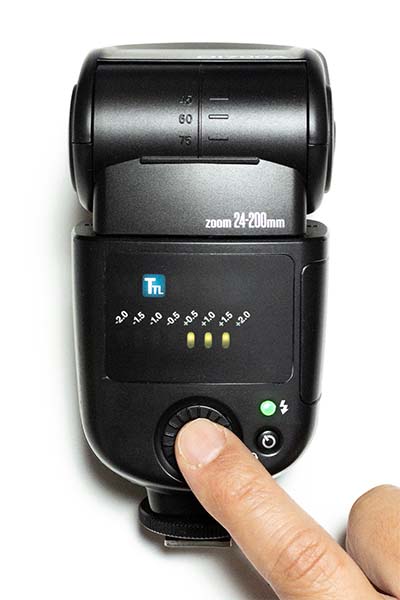
Di700A Frequently Asked Questions (FAQ)
Frequently asked questions and answers regarding the Di700A. You can narrow down your search using the search box at the top of the page. If your issue is not resolved, please contact us.
FAQ List (7 items)
- Pairing and basic operations
- When the Di700A is mounted directly on the camera, can I set the head zoom (illumination angle) manually?
- How well does it support continuous shooting?
- What is the GN at 16mm illumination angle?
- Can I use an external power source for the Di700A?
- How to replace the Di700A hot shoe
- Resetting the Di700A
Q. Pairing and basic operations
Supported models: Di700A, Air1
A. 2018 Copyright Nissin Japan Ltd all rights reserved
Q. When the Di700A is mounted directly on the camera, can I set the head zoom (illumination angle) manually?
Supported models: Di700A
A. No, you cannot. It is set to automatic illumination angle only.
When mounted on the camera's hot shoe, it receives lens information from the camera to automatically adjust the illumination angle, so you cannot set it manually to an arbitrary position.
However, for the Canon version only, when mounted on the camera's hot shoe, you can set it manually in the 24–105mm range via the "External Flash Function Settings" menu on the camera body.
When used off-camera, the illumination angle is maintained at the setting used previously. Once the wide panel is pulled out and retracted, it is automatically fixed to 35mm.
Note that if the head is positioned at an angle other than straight forward, it will be automatically fixed to 35mm due to the product's specifications, regardless of whether it is on-camera or off-camera. (If the wide panel is pulled out, it is fixed at the 24mm end.)
Please note that you will no longer be able to operate the illumination angle zoom from the camera or the Air1.
Q2-04
When mounted on the camera's hot shoe, it receives lens information from the camera to automatically adjust the illumination angle, so you cannot set it manually to an arbitrary position.
However, for the Canon version only, when mounted on the camera's hot shoe, you can set it manually in the 24–105mm range via the "External Flash Function Settings" menu on the camera body.
When used off-camera, the illumination angle is maintained at the setting used previously. Once the wide panel is pulled out and retracted, it is automatically fixed to 35mm.
Note that if the head is positioned at an angle other than straight forward, it will be automatically fixed to 35mm due to the product's specifications, regardless of whether it is on-camera or off-camera. (If the wide panel is pulled out, it is fixed at the 24mm end.)
Please note that you will no longer be able to operate the illumination angle zoom from the camera or the Air1.
Q2-04
Q. How well does it support continuous shooting?
Supported models: Di700A
A. The number of shots possible during continuous shooting varies greatly depending on the flash output, the presence of an external power source, the camera's continuous shooting speed, etc., so it cannot be summarized generally.
As a reference, when using a fully charged Power Pack PS8, it is possible to keep up with speeds of up to 10 frames per second at a flash output of about 1/8. (During high-speed sync flash, because the firing method is different, it is difficult to keep up even at the minimum light output and 3–4 frames per second, and performance does not improve much even when using the PS8.)
The NAS (Nissin Air System) specifications support continuous shooting up to 10 frames per second. Higher continuous shooting speeds cannot be synchronized due to communication signal conversion lag.
Q2-05
As a reference, when using a fully charged Power Pack PS8, it is possible to keep up with speeds of up to 10 frames per second at a flash output of about 1/8. (During high-speed sync flash, because the firing method is different, it is difficult to keep up even at the minimum light output and 3–4 frames per second, and performance does not improve much even when using the PS8.)
The NAS (Nissin Air System) specifications support continuous shooting up to 10 frames per second. Higher continuous shooting speeds cannot be synchronized due to communication signal conversion lag.
Q2-05
Q. What is the GN at 16mm illumination angle?
Supported models: Di700A
A. The guide number (ISO 100) with the wide panel pulled out (16mm illumination angle) is "17".
Q2-14
Q2-14
Q. Can I use an external power source for the Di700A?
Supported models: Di700A
A. Yes, it is supported. The connector shape for Nikon, Canon, and Sony is the same as the respective manufacturer's original external power sources.
Usable external power sources include the Nissin Power Pack PS8, PS300, and Pro 300N, as well as genuine battery packs from each camera manufacturer. (Please note that for the Nikon version, the Nikon SD-8A cannot be used while off-camera.)
The Four Thirds and Fujifilm versions use a connector with the same shape as the Sony genuine connector. Therefore, please select the "Sony cord" if you are using our Power Pack. Note that although the connector shape is the same, operation is not guaranteed with Sony external power sources.
Q2-15
Usable external power sources include the Nissin Power Pack PS8, PS300, and Pro 300N, as well as genuine battery packs from each camera manufacturer. (Please note that for the Nikon version, the Nikon SD-8A cannot be used while off-camera.)
The Four Thirds and Fujifilm versions use a connector with the same shape as the Sony genuine connector. Therefore, please select the "Sony cord" if you are using our Power Pack. Note that although the connector shape is the same, operation is not guaranteed with Sony external power sources.
Q2-15
Q. How to replace the Di700A hot shoe
A. [Caution]
Replacing the hot shoe requires tools such as a screwdriver. This is a task for advanced users as it involves potential contact with internal parts. There is no warranty for failures or malfunctions caused by the customer replacing the shoe themselves.
Please do not touch internal parts or wires not related to the work. If you are uncomfortable with the process, we recommend "standard repair" by sending it to our service center (this is treated as a minor repair).
Changing only the shoe part to one for a different mount will not change the camera compatibility. If replaced with a shoe for a mount different from the original, it will not function properly in any mode during on-camera shooting. (It will not work even if the firmware is rewritten.)
[Items required]
・Flash unit
・Replacement hot shoe parts (available at the Nissin Digital Direct main store)
・Precision Phillips screwdriver (Size: No. 0)
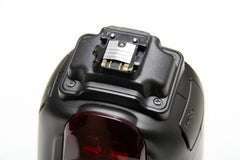 The flash in the photo is the "Di700A for Sony". One of the claws is broken.
Since the shoe plate is made of resin, it is a part that is easily damaged if subjected to strong impact.
1. Remove the batteries and remove the 4 screws at the base of the shoe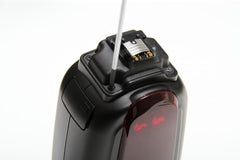 Use a precision Phillips screwdriver to remove the 4 screws. Note that the removed screws will be reused, so be careful not to lose them.
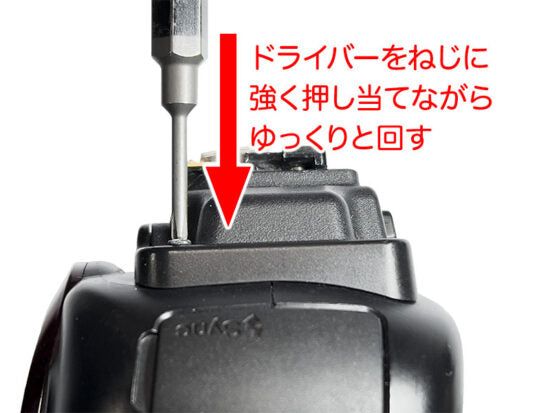
If a screw is tight and will not turn, forcing it may strip the grooves and make it impossible to remove. Try pressing the screwdriver firmly into the screw (without damaging the resin parts) and turn it slowly.
(Please be very careful not to let the screwdriver slip and poke the hand holding the flash body.)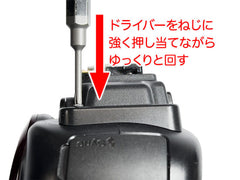 2. Pull out the shoe body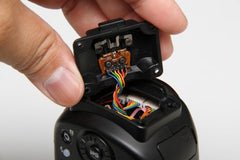
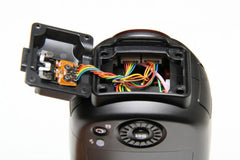 Once the screws are removed, hold the shoe part and pull it up. Be careful not to pull too hard, as it is still connected by a wire. 3. Unplug the shoe wire and remove the damaged shoe part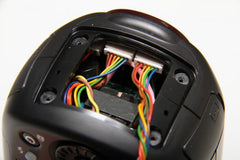
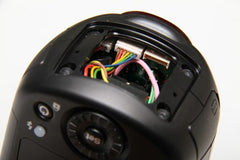 There is a specific orientation for the shoe wire, so we recommend making a note to avoid confusion later. 4. Don't forget the spacer if there is one
 For Sony, Four Thirds, and Fujifilm versions, a spacer is sandwiched between the shoe part and the body.
It is fine to remove the spacer during work, but please don't forget to attach it when reassembling. 5. Reassemble in reverse order and you're done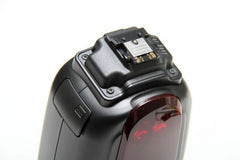 Among Nissin flashes, only the Di700A and Di700 (legacy product) allow user-performed shoe replacement, so if you are confident in your skills or want to avoid waiting for repairs, we encourage you to replace the parts yourself!
Note that the i40, i60A, Air1, and Air10s, which have similar hot shoe shapes, have some different specifications and cannot be replaced by customers.
Other products are also not designed to be replaced by customers, so please never disassemble them.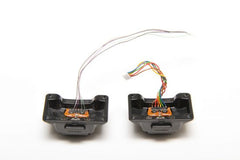 Left: Hot shoe for i40, Right: Hot shoe for Di700A
Replacement hot shoe parts for each mount are available at the Nissin Digital Direct main store, so please make use of them!!
For Di700A/Di700 mount-specific parts, please contact us.
Replacing the hot shoe requires tools such as a screwdriver. This is a task for advanced users as it involves potential contact with internal parts. There is no warranty for failures or malfunctions caused by the customer replacing the shoe themselves.
Please do not touch internal parts or wires not related to the work. If you are uncomfortable with the process, we recommend "standard repair" by sending it to our service center (this is treated as a minor repair).
Changing only the shoe part to one for a different mount will not change the camera compatibility. If replaced with a shoe for a mount different from the original, it will not function properly in any mode during on-camera shooting. (It will not work even if the firmware is rewritten.)
[Items required]
・Flash unit
・Replacement hot shoe parts (available at the Nissin Digital Direct main store)
・Precision Phillips screwdriver (Size: No. 0)
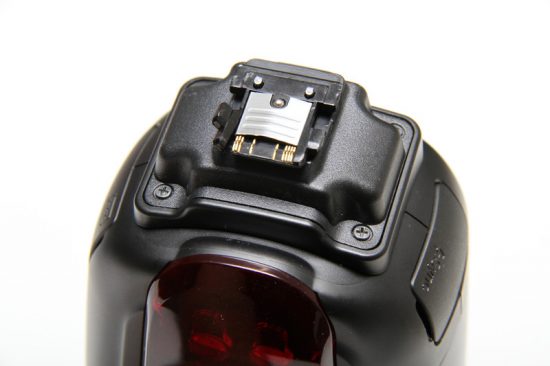 The flash in the photo is the "Di700A for Sony". One of the claws is broken.
Since the shoe plate is made of resin, it is a part that is easily damaged if subjected to strong impact.
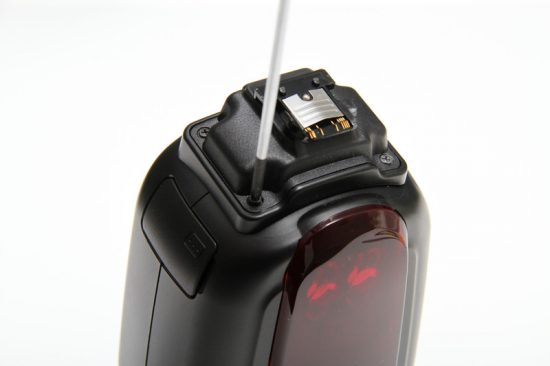
If a screw is tight and will not turn, forcing it may strip the grooves and make it impossible to remove. Try pressing the screwdriver firmly into the screw (without damaging the resin parts) and turn it slowly.
(Please be very careful not to let the screwdriver slip and poke the hand holding the flash body.)
 2. Pull out the shoe body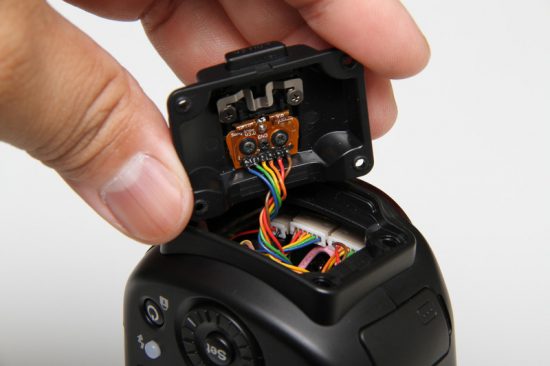

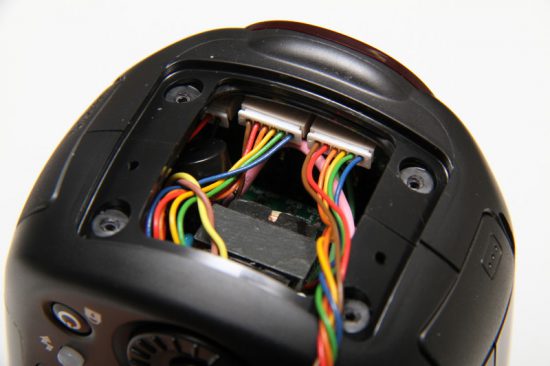
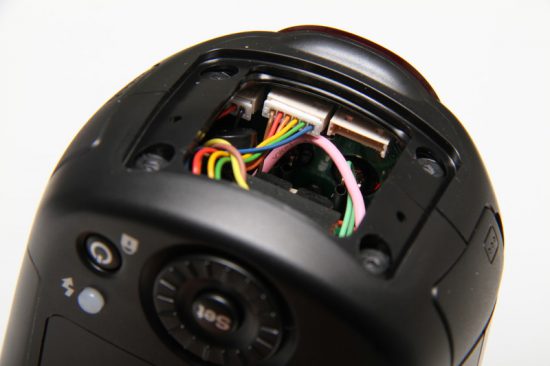
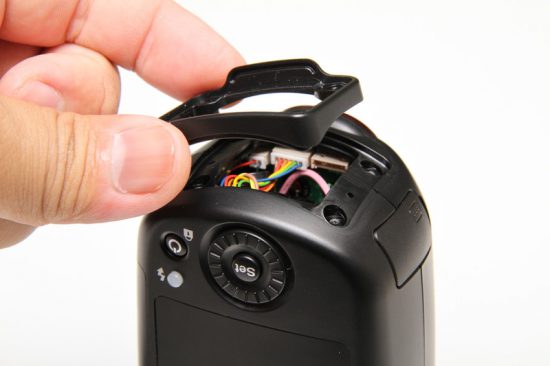
It is fine to remove the spacer during work, but please don't forget to attach it when reassembling. 5. Reassemble in reverse order and you're done
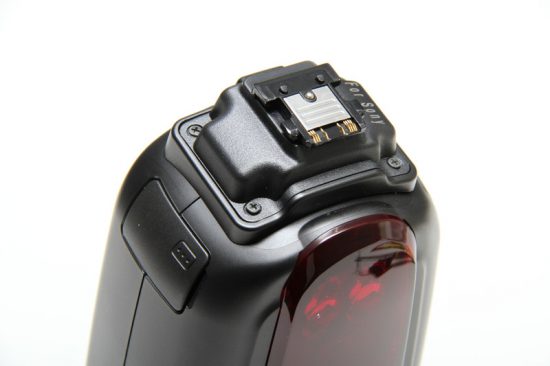
Note that the i40, i60A, Air1, and Air10s, which have similar hot shoe shapes, have some different specifications and cannot be replaced by customers.
Other products are also not designed to be replaced by customers, so please never disassemble them.
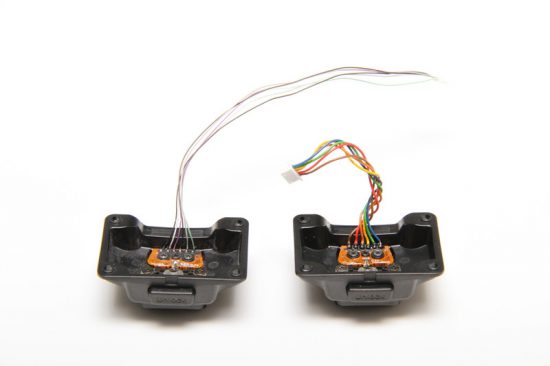
Replacement hot shoe parts for each mount are available at the Nissin Digital Direct main store, so please make use of them!!
For Di700A/Di700 mount-specific parts, please contact us.
Q. Resetting the Di700A
A.
Resetting the Di700A
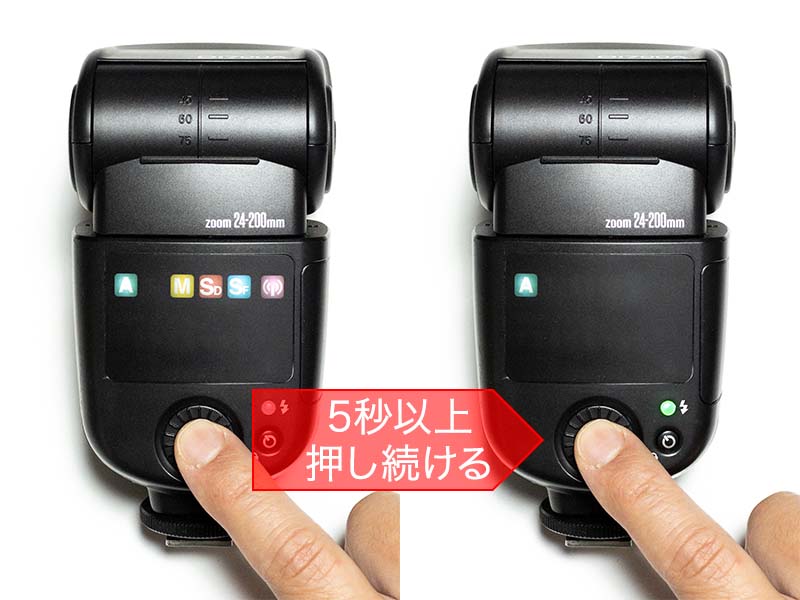
- With the power on, press and hold the Set button.
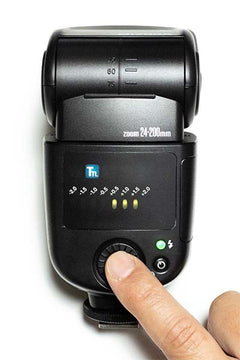
- Continue pressing the Set button for at least 5 seconds, and release your finger after the green A (Full Auto Mode) icon lights up (lights up again) to complete the reset.
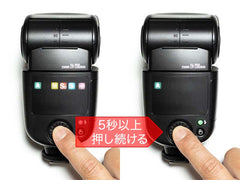
- Pairing information is not deleted even if you perform a reset, so usually there is no need to redo the pairing work. Only redo it if the commander and flash are not synchronizing properly.