
i60A Frequently Asked Questions (FAQ)
These are frequently asked questions and answers regarding the i60A. You can narrow down your desired question using the search box at the top of the page. If your issue is not resolved, please contact us.
List of Questions (5)
- How many times can I fire the flash continuously?
- What is the shape of the external power terminal?
- Pairing is complete, but the flash will not fire.
- The i60A/Di700A does not fire even after pairing with the EF-W1 (manufactured by FUJIFILM)
- The i60A/Di700A/AirR does not fire even after pairing with the Air10s or MG80 Pro
Q. How many times can I fire the flash continuously?
Applicable Models: i60A, i600, i40, i400, Di700A
If used continuously, the overheat protection function will activate, the pilot lamp will blink red, a buzzer will sound, and the flash will stop firing entirely. In this case, turn off the power and wait until the unit has cooled down sufficiently. (It will resume automatically once cooled.)
Note that repeatedly firing at high power, especially in the wide position, may cause the front Fresnel lens to melt or scorch, or the flash tube to break.
Please be aware that in such cases, parts replacement is required, and all repairs will be charged regardless of the warranty status.
Q. What is the shape of the external power terminal?
Applicable Models: i60A, Di700A
It is also possible to use external power sources for camera manufacturer-genuine flashes that use AA batteries with Nissin flashes.
Please note that for our Four Thirds (Micro Four Thirds) and FUJIFILM versions, the connectors are all designed for Sony. If you wish to use an external power source with these, you will need to purchase the "Power Pack PS8 (for Sony)" or, if you already own a Power Pack, a separate "Power Cord for Power Pack (for Sony)" is required. (We have not tested compatibility with external power sources designed for Sony flashes.)
Q. Pairing is complete, but the flash will not fire.
Applicable Models: i60A
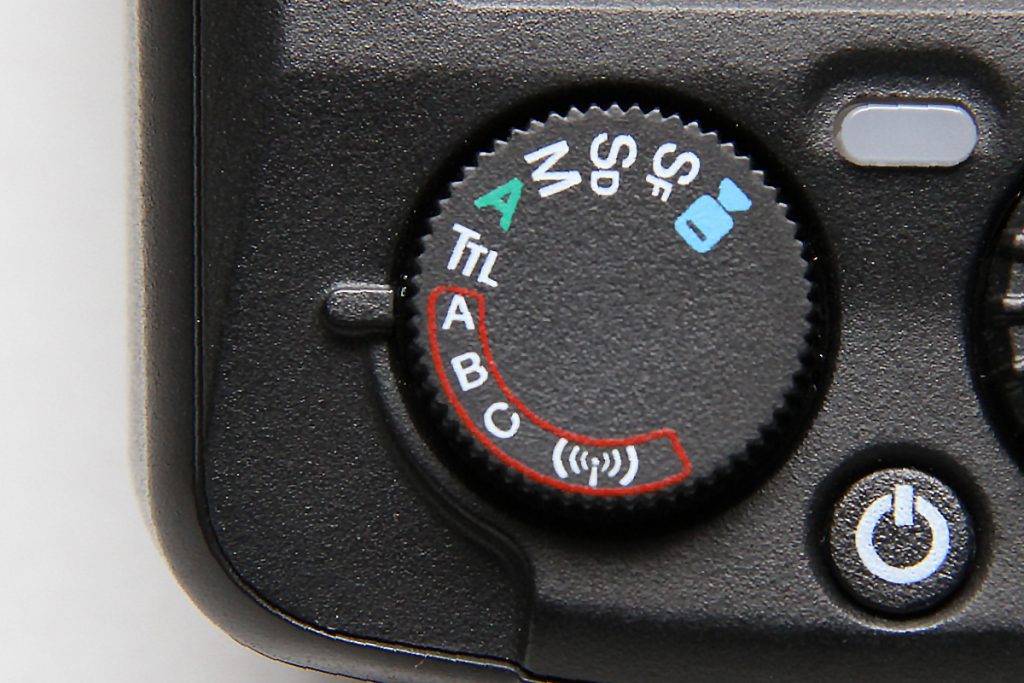 The Wireless TTL mode is the "A-C" position enclosed by the red frame on the dial. A/B/C represent individual flash groups, so please set it to the desired group. The "A" in green on the dial is the "Full Auto Mode" used when mounting the flash on the camera. Please note that this is not for wireless flash group A.
The photo above shows the state where the dial is set to the wireless TTL A group. (The dial design may differ slightly depending on the mount.)
By setting it this way, you will be able to communicate with and control the flash from the commander.
Q. The i60A/Di700A does not fire even after pairing with the EF-W1 (manufactured by FUJIFILM)
Applicable Models: i60A, Di700A
EF-W1 and i60A/Di700A are compatible, but they will not communicate on communication channel "1".
The EF-W1 communication channel "1" can communicate with genuine FUJIFILM flashes (EF-60) and our MG series flashes, but not with the i60A and Di700A.
Immediately after resetting the EF-W1 (factory default state), the communication channel is set to 1, so it will not fire (be controlled) even if you pair it as is. Please change the EF-W1 communication channel to any channel from 2 to 8 before pairing.
I changed the channel to 1, and now it won't fire even when I change it to other channels.
When the i60A communication channel is set to A (Auto) or while using the Di700A, if you change the EF-W1 channel from 2–8 to 1, the i60A/Di700A channel will also automatically switch to 1. However, since communication with the EF-W1 is lost at that point, the i60A/Di700A channel will not automatically switch back even if you change the EF-W1 channel later.
Therefore, please manually set the i60A channel to the same channel as the EF-W1 (the Di700A cannot be switched manually), or turn off the power on both devices and re-pair them. (Please be sure to confirm that the EF-W1 channel is set to something other than 1 before pairing.)
Caution when turning off the power
Depending on the model, such as the Di700A, the power cannot be turned off unless you hold down the power button, so users tend to hold it down for the EF-W1 as well. Please be aware that if you hold it for 3 seconds or longer, it will reset and the channel will switch to 1.
Q. The i60A/Di700A/AirR does not fire even after pairing with the Air10s or MG80 Pro
Applicable Models: i60A, Di700A, Air R
The Air10s or MG80 Pro (Commander Mode) and i60A/Di700A/AirR are compatible, but they will not communicate on communication channel "1".
The communication channel "1" of the Air10s/MG80 Pro (Commander Mode) can communicate with MG series flashes, but not with the i60A, Di700A, or AirR.
It will not fire (be controlled) if paired while the Air10s/MG80 Pro channel is set to "1", so please pair after resetting or changing the communication channel of the Air10s/MG80 Pro to any channel from 2 to 8.
I changed the channel to 1, and now it won't fire even when I change it to other channels.
When the i60A/AirR communication channel is set to A (Auto) or while using the Di700A, if you change the Air10s/MG80 Pro (Commander Mode) channel from 2–8 to 1, the i60A/Di700A/AirR channel will also automatically switch to 1. However, since communication with the Air10s/MG80 Pro is lost at that point, the i60A/Di700A/AirR channel will not automatically switch back even if you change the Air10s/MG80 Pro channel later.
Therefore, please manually set the i60A/AirR channel to the same channel as the Air10s/MG80 Pro (the Di700A cannot be switched manually), or turn off the power on both devices and re-pair them. (Please be sure to confirm that the Air10s/MG80 Pro channel is set to something other than 1 before pairing.)