MG60 / MG-X Frequently Asked Questions (FAQ)
These are frequently asked questions and answers regarding the MG60 and MG-X. You can narrow down the question you are looking for by using the search box at the top of the page. If your issue is not resolved, please contact us.
List of Questions (12 items)
- Which lithium-ion batteries and chargers are verified for use with the MG-X, MG60, and MG80Pro?
- What does the collaboration with Nikon Corporation entail?
- Can external power sources such as the Power Pack PS8 be used?
- Does the AF assist light fire?
- Can I use it with a camera that is not listed on the compatibility chart?
- The recycling time is slower than the specifications.
- The battery icon lights up even though there is still sufficient battery life.
- There is a "popping" sound when the flash fires. Is this a malfunction?
- Can I use wireless multi-flash (stroboscopic) mode?
- I want a smaller charger
- How to replace the hotshoe
- How to reset the MG60 / i60A
Q. Which lithium-ion batteries and chargers are verified for use with the MG-X, MG60, and MG80Pro?
The recommended battery for the MG-X, MG60, and MG80Pro is a 14500-type lithium-ion battery with a protection circuit. While AA batteries can also be used, lithium-ion batteries offer the advantage of a higher flash count and shorter recycling time. However, please handle them with extreme care, as lithium-ion batteries are delicate and sensitive to heat and impact. Never use types without a protection circuit.
Verified Rechargeable Batteries:
KEEPPOWER 14500 Lithium-ion battery (with protection circuit) 1000mAh (KP14500 / P1450C2)
KEEPPOWER 14500 Lithium-ion battery (with protection circuit) 1100mAh (P1450C3)
※ Since lithium-ion batteries have a higher output voltage (nominal 3.7V) than standard AA batteries (nominal 1.2V–1.7V), never use them in equipment designed for AA batteries (alkaline, manganese, lithium, oxyride, Ni-Cd, or Ni-MH). This will cause equipment failure.
※ Batteries with a special design where both positive and negative electrodes are on the same side cannot be used.
Example of a battery that cannot be used→Protected 14500 Li-ion Rechargeable Battery P1450C3 with "+"&"-" in positive pole
Verified Chargers:
XTAR MC4S USB Charger *1 (Charges 1–4 batteries simultaneously)
XTAR VC8 USB Charger *1 (Charges 1–8 batteries simultaneously)
KEEPPOWER L2 Charger *2*4 (Charges 1–2 batteries simultaneously)
MiBoxer C4 Charger *3 (Charges 1–4 batteries simultaneously)
MiBoxer C8 Charger *3 (Charges 1–8 batteries simultaneously)
MiBoxer C4-12 Charger *3 (Charges 1–4 batteries simultaneously)
※ Lithium-ion batteries cannot be charged using chargers designed exclusively for standard Ni-Cd or Ni-MH batteries.
*1 Requires a separate USB power adapter.
*2 For lithium-ion batteries only. Other types of rechargeable batteries such as Ni-MH cannot be charged.
*3 Because these chargers are compatible with sizes other than 14500, please note that you may need to set the battery slightly raised to ensure contact depending on the terminal shape.
For more information on chargers, see this column.
Q. What does the collaboration with Nikon Corporation entail?
Applicable models: MG60
Q. Can external power sources such as the Power Pack PS8 be used?
Applicable models: MG60
Q. Does the AF assist light fire?
Applicable models: MG60
Q. Can I use it with a camera that is not listed on the compatibility chart?
Applicable models: MG60
Q. The recycling time is slower than the specifications.
Applicable models: MG60
Q. The battery icon lights up even though there is still sufficient battery life.
Applicable models: MG60
Q. There is a "popping" sound when the flash fires. Is this a malfunction?
Applicable models: MG60
Q. Can I use wireless multi-flash (stroboscopic) mode?
Applicable models: MG60
Q. I want a smaller charger
Applicable models: MG-X, MG60, MG80 Pro
The MG-X, MG60, and MG80 Pro use lithium-ion rechargeable batteries that are roughly the same size as AA batteries (14500-size batteries with a protection circuit).
While the batteries themselves are small and portable, the chargers verified for operation by our company are designed to charge larger batteries, such as the 26650 size, and are therefore significantly larger than chargers for AA Ni-MH batteries.
Since the manufacturer of the lithium-ion batteries sold by our company (KEEPPOWER) does not produce compact chargers, we looked to see if there were any smaller chargers available from other companies.
We purchased two models through online retail and tested them with our lithium-ion rechargeable batteries.
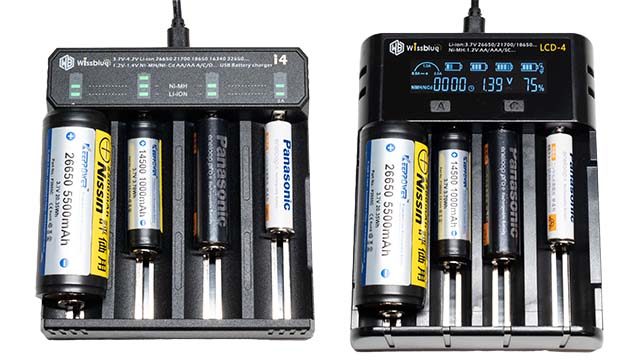
The batteries in the charger are, from the left: 26650-type Li-ion, 14500-type Li-ion, AA Ni-MH, and AAA Ni-MH. (They can be charged simultaneously.)
① Wissblue i4
This product comes with the main unit and a USB TypeA to USB microB cable for charging; the USB power source (USB TypeA output 5V 2A or higher) is sold separately. The measured external dimensions and weight were 103mm (W) x 111mm (L) x 29mm (H) and 109g. (Excluding USB cable). (The KEEPPOWER L4 charger sold by our company is 113mm (W) x 164mm (L) x 50mm (H), 236g (manufacturer's nominal value), and the AC adapter is 130g (measured value including cord)).
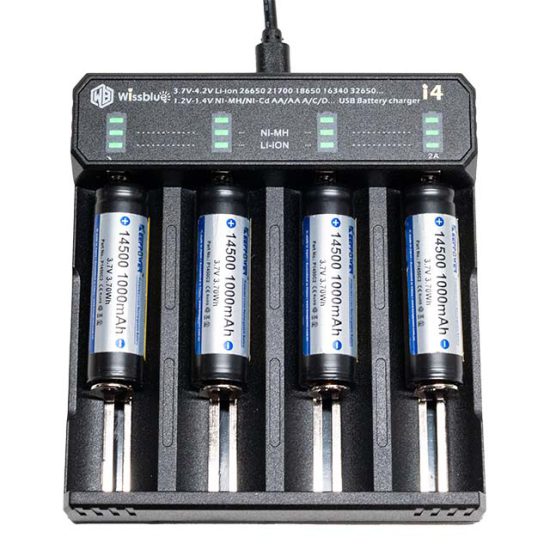
When a battery is inserted, it identifies the battery type (Ni-MH / Li-ion) and indicates this by the LED lighting position. It then switches to charging mode and displays the charge level via three flashing LEDs. When charging is complete, all three LEDs light up. The charging time for an 1,100mAh Li-ion battery was approximately 2.5 hours.
② Wissblue LCD-4
This product comes with the main unit, a USB TypeA to USB microB cable for charging, and a pouch; the USB power source is also sold separately. The measured external dimensions and weight were 98mm (W) x 123mm (L) x 33mm (H) and 141g. (Excluding USB cable).
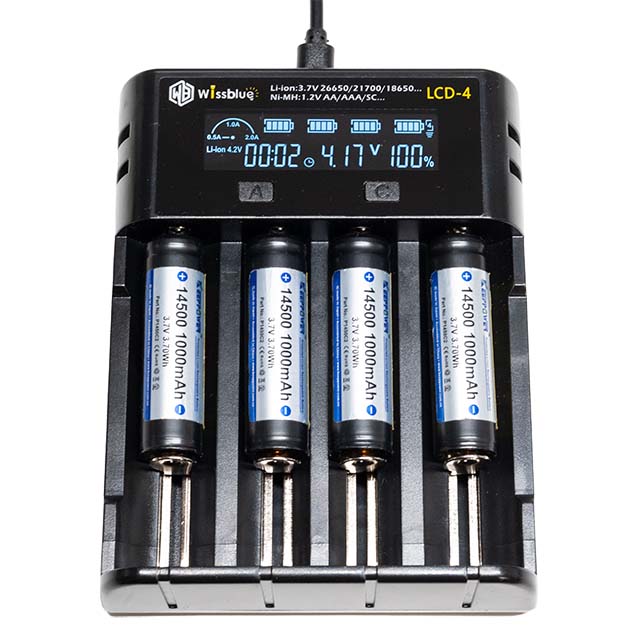
The built-in LCD displays the charging status of the batteries. It also supports charging for Ni-MH and Ni-Cd batteries. The charge amount is displayed in 1% increments, but this should be considered an estimate based on terminal voltage, etc. The charging time for an 1,100mAh Li-ion battery was approximately 2 hours and 10 minutes.
Cautions
- The chargers introduced in this article are not guaranteed for operation by our company. Please inquire with the retailer regarding product compatibility and specifications.
- The charging times in this article are measured values and not guaranteed. Actual charging time will vary depending on the charge level at the start, the battery condition (degree of degradation), and the performance of the power source connected to the charger.
Q. How to replace the hotshoe
Applicable models: MG60
You can replace the hotshoe (mounting foot) of the MG60 yourself.
This page explains how to replace the hotshoe.
Cautions
- Always replace it with a hotshoe of the same model and mount as your product.
While it is physically possible to install a hotshoe for a different mount, the internal circuit board is different for each mount, so it will not function properly even if you update the firmware. - If the flash does not work properly even after replacing the hotshoe, repairs may be required. In such cases, standard repair fees will apply even after the hotshoe has been replaced.
(Even if there is no significant external damage, if the power does not turn on or it does not fire when the pilot lamp is pressed, repairs are usually required.) - Our company will not be held responsible if you fail in the procedure. Please proceed at your own risk.
- If you are not confident in performing the replacement yourself, please request a repair from us. (A standard minor repair fee will apply.)
How to obtain parts
Available only at the Nissin Digital Direct main store.
For MG60 Canon
Nissin Digital MG60 Hotshoe ASSY for Canon XXHF
For MG60 Nikon
Nissin Digital MG60 Hotshoe ASSY for Nikon XXHG
Required tools
- Flash unit
- Replacement part (above)
- #0 Phillips (+) screwdriver
(Screwdriver numbers become thinner as they go from #2 to #1 to #0. Sizes smaller than #0 are #00, etc.) - Tweezers (if necessary)
Procedure
1. For safety, remove the batteries, unscrew the 4 screws, and gently lift the hotshoe. (Keep the screws as you will reuse them.)
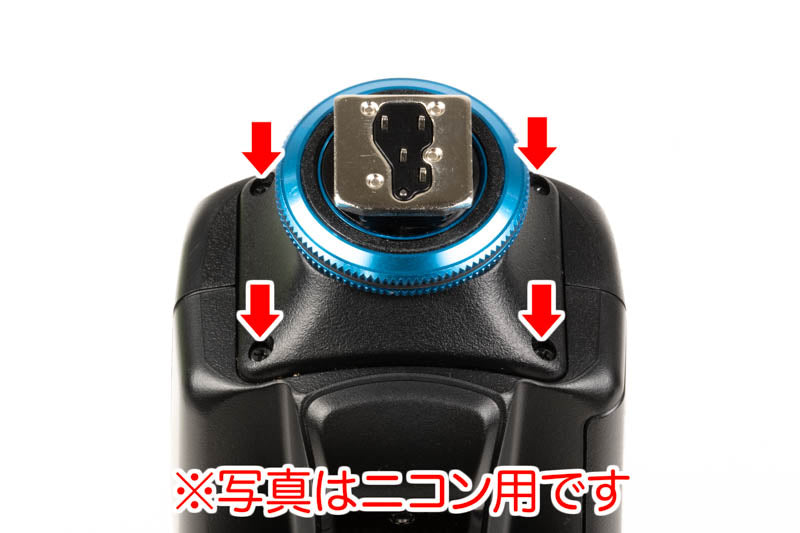
- If the screws are tight and do not turn, do not force them, or you may strip the head. Try pressing the screwdriver firmly into the screw (enough to not damage the resin parts) and turn slowly. (Please be very careful not to let your hand slip and jab the screwdriver tip into the hand holding the flash unit.)
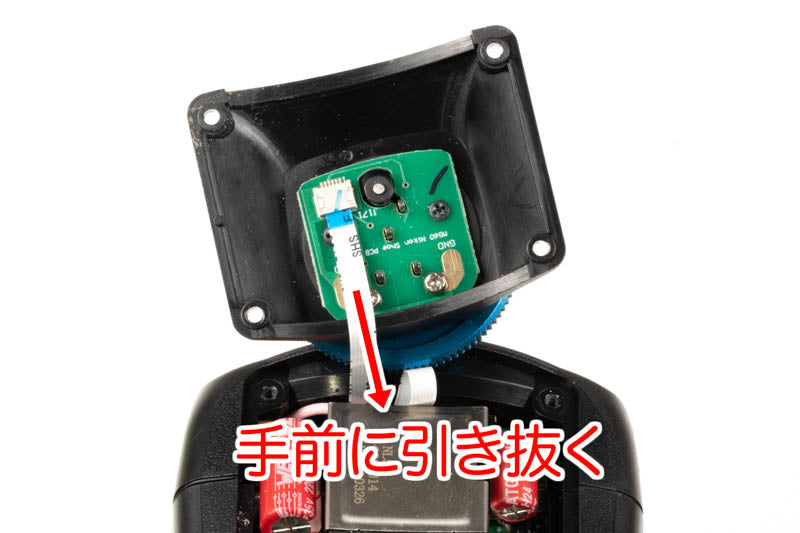
2. Hold the hotshoe and the white flat cable with your left and right hands, and pull the cable out parallel to the hotshoe circuit board.
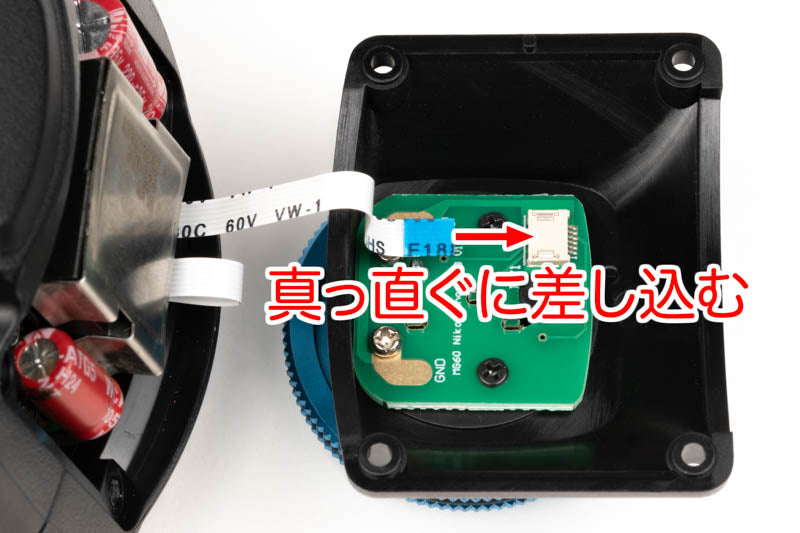
3. Insert the white flat cable into the connector of the new hotshoe until you feel it reach the back. Since the screws in front of the connector may be in the way, it may be easier to use tweezers. (Be careful not to damage the flat cable with the tips of the tweezers.)
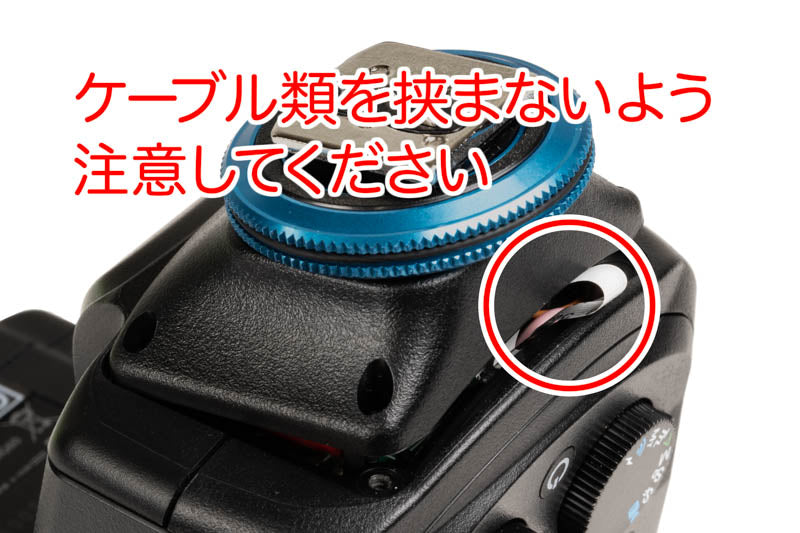
4. Fit the hotshoe into the main body, ensuring no cables are caught in between, and secure it with the 4 screws. (Please be careful not to overtighten, or you will damage the screw threads on the unit side.)
Q. How to reset the MG60 / i60A
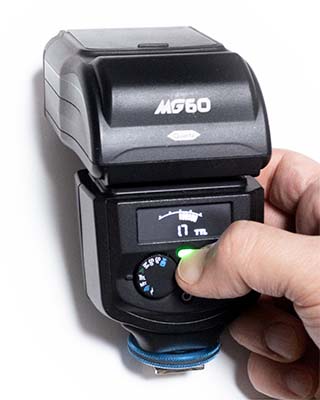
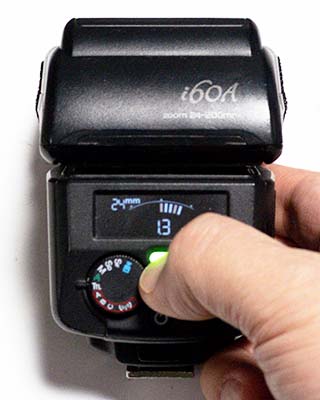
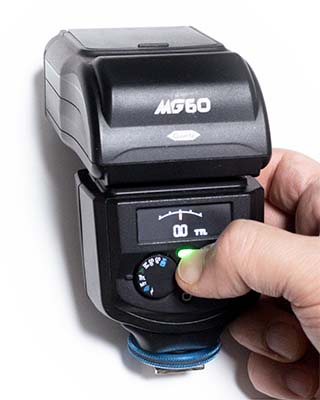
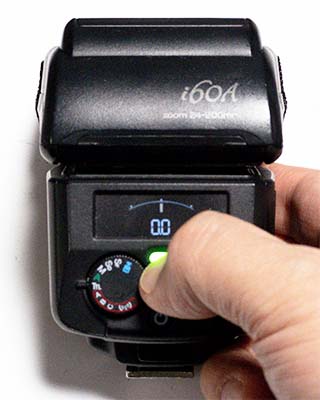
How to reset the MG60 / i60A
- With the power on, press and hold the pilot lamp (test fire button) for 3 seconds or more.
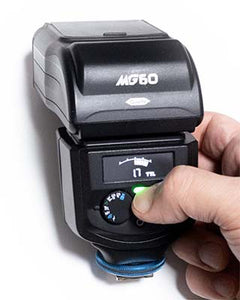
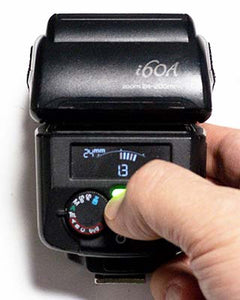
- The reset is complete when you release your finger after the display switches to 0EV in TTL mode, 1/256 output in M/SD/SF mode, or Channel A/Group A in NAS slave mode (MG60).
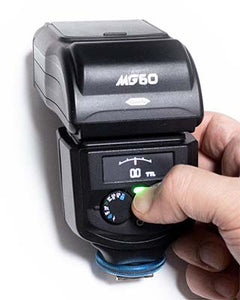
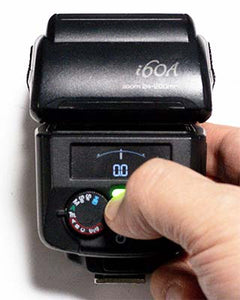
- Pairing information is not deleted by performing the reset operation, so you generally do not need to redo the pairing process. Only redo it if the commander and flash are not syncing properly.