
MG8000 Frequently Asked Questions (FAQ)
These are frequently asked questions and answers regarding the MG8000. You can narrow down your search using the search box at the top of the page. If your issue remains unresolved, please contact us.
List of Questions (1)
Q. How to check the firmware version for the MG8000 / Di866 MARK II
A. (1) Insert the batteries and turn on the flash.
(2) Press the Set button to return to the main menu, then select the purple "Setting" icon in the bottom right.
(3) Continue pressing the down button on the directional pad to go to the second page, where you will find a "Firmware" item. Move the cursor to it.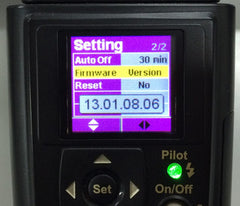 (4) A number separated by four dots will be displayed; the two numbers on the right represent the firmware version.
(In the photo, the version is 8-6.)
Please check here for the latest firmware version.
(2) Press the Set button to return to the main menu, then select the purple "Setting" icon in the bottom right.
(3) Continue pressing the down button on the directional pad to go to the second page, where you will find a "Firmware" item. Move the cursor to it.
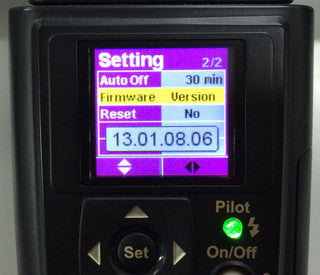 (4) A number separated by four dots will be displayed; the two numbers on the right represent the firmware version.
(In the photo, the version is 8-6.)
Please check here for the latest firmware version.