
Power Pack PS8 Frequently Asked Questions (FAQ)
Here are frequently asked questions and answers regarding the Power Pack PS8. You can filter for the question you are looking for using the search box at the top of the page. If your issue is not resolved, please contact us.
List of Questions (13 items)
- Can I top-up the charge on the Ni-MH Cluster Battery or the Ni-MH Battery Pack 3000?
- I connected the battery to the charger, but the charging indicator lamp does not light up.
- I feel like the battery life is shorter than the values published in the catalog.
- The power pack suddenly stopped working.
- What is the output of the USB charging port?
- How should I store it when not in use for a long period?
- Can I plug different mount cords, such as a Canon power cord and a Nikon power cord, into the power pack simultaneously to charge?
- Can I fire/charge two flash units at the same time?
- Can the Nikon version be connected to an SK-6 bracket?
- The power pack battery won't charge?
- The flash won't turn on even though I connected the power pack.
- Which mount should I choose when connecting to the MG10, MG8, or flashes for Fujifilm, Olympus/Panasonic?
- The battery life is poor even after a full charge.
Q. Can I top-up the charge on the Ni-MH Cluster Battery or the Ni-MH Battery Pack 3000?
Applicable models: PS8
A. There is no significant memory effect, so you may top-up the charge. However, repeatedly top-up charging when the battery level has barely decreased can rarely lead to extremely poor battery life. In such cases, discharging the battery completely before recharging it will restore its capacity.
Q. I connected the battery to the charger, but the charging indicator lamp does not light up.
Applicable models: PS8, PS-300, PS-400
A. If the battery has not been used for a long period, the charging indicator lamp may not light up until the voltage reaches a level where charging can begin. Depending on the state of the battery, leaving it for 20 to 30 minutes will allow charging to start, so this is not a malfunction. If charging does not start after 30 minutes, or if charging finishes abnormally quickly, there may be a defect in the battery or charger; please contact us.
Q. I feel like the battery life is shorter than the values published in the catalog.
Applicable models: PS8
A. Catalog values are actual measurements taken in our internal test environment. Discrepancies may occur under actual usage conditions. Especially in low-temperature environments, such as below freezing, battery life significantly decreases due to the characteristics of Ni-MH batteries. Keeping the unit warm can provide some improvement. Additionally, battery life also decreases if the battery becomes hot from continuous use; we recommend allowing it to rest periodically if possible. Generally, the normal operating temperature range for Ni-MH rechargeable batteries is -10 to 65°C, with 0 to 45°C being the optimal range. For long-term storage, room temperature (10 to 30°C) is ideal. If not used for a long time or immediately after purchase (if time has passed since manufacturing), the characteristics of the internal Ni-MH battery may change, reducing its charging capacity (battery inactivation). In this case, repeating the charge/discharge cycle several times will restore the capacity and return it to a normal state (battery activation).
Q. The power pack suddenly stopped working.
Applicable models: PS8
A. This product features two protection circuits—a "current fuse" and a "thermostat"—in both the main unit and the dedicated battery. When it stops functioning, it indicates that the protection circuit has been triggered due to a temperature rise or some other abnormality. The thermostat will reset after about 10 minutes, but the current fuse will not. If the current fuse has blown, it requires repair, so please consult our service department.
Q. What is the output of the USB charging port?
Applicable models: PS8
A. When fully charged, the USB charging port provides an output of 3,000mAh/2A, allowing most USB-connectable devices to be charged. However, it may not be able to charge a device from a completely empty state. With a fully charged battery attached, you can charge an iPhone about 1.5 times or an iPad by about 40%.
Q. How should I store it when not in use for a long period?
Applicable models: PS8
A. To prevent over-discharge of the Ni-MH cluster battery and subsequent electrolyte leakage, we recommend removing the battery from the unit and storing it with a partial charge when not in use for an extended period (several weeks or more). (Frequently repeating top-up charging to full capacity can lead to an overcharged state, shortening battery life.) Storing at room temperature (10 to 30°C) is ideal.
Q. Can I plug different mount cords, such as a Canon power cord and a Nikon power cord, into the power pack simultaneously to charge?
Applicable models: PS8
A. Since the main unit is common, there is no problem with doing this.
Q. Can I fire/charge two flash units at the same time?
Applicable models: PS8
A. There are two power cord sockets, so you can connect and fire/charge two flash units simultaneously. However, the charging speed will be slower. Example: If you attach two identical flash units and charge them simultaneously, the time to complete charging will be approximately double compared to charging only one unit.
Q. Can the Nikon version be connected to an SK-6 bracket?
Applicable models: PS8
A. Yes. You can charge a flash unit docked to an SK-6.
Q. The power pack battery won't charge?
A. The external flash power supply "Power Pack PS8" features an extremely high charging speed. As the battery is a cassette-type Ni-MH rechargeable battery, it is easy to manage and replace. Since it is not classified as hazardous material, there are no restrictions on air transport, and it can be used with genuine Canon, Nikon, and Sony flashes, making it very popular among many professional users since its release.
As autumn approaches, opportunities to use this power pack for weddings or sports event photography will increase. Every year at this time, we receive the following inquiry: "I am charging the battery, but there is no sign that it is charging. The red charging lamp does not light up. Is it broken?" Actually, in many cases, this is not a malfunction.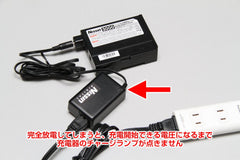 You connect the battery to the charger and plug it in, but the red charging lamp does not light up. Why is that?
This phenomenon occurs when the battery is in an "over-discharged state" due to long periods of disuse, severe depletion, or forgetting to turn off the power after use.
Because there is not enough voltage to begin charging, rapid charging does not start, and the charging lamp remains off during that time.
So, what should you do? You don't need to do anything special; simply "leave it in the charging state for about 30 minutes to an hour."
First, it will charge slowly until it reaches the voltage level necessary for charging to begin, and once it reaches the specified voltage, rapid charging will start and the red lamp will light up.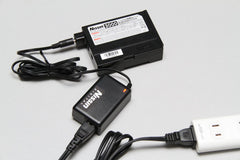 If you leave it for about 30 minutes, the red lamp will light up like this and charging will begin.
 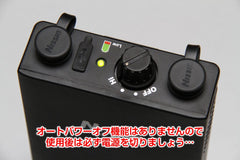 Don't forget to turn off the power after use. This unit does not have an auto-power-off function; if you leave it on, the battery will be drained completely.
It is said that keeping a battery in an over-discharged state, or conversely, always keeping it fully charged, is bad as it shortens battery life.
Unless you use it frequently, if you use it only occasionally, we recommend "fully charging before use and storing it as is after you finish shooting."
If the red lamp does not light up even after starting, please try charging it for about an hour to see if the red lamp lights up and charging begins. If it still does not light up, there may be a malfunction in the battery or charger; please contact us for an inspection.
As autumn approaches, opportunities to use this power pack for weddings or sports event photography will increase. Every year at this time, we receive the following inquiry: "I am charging the battery, but there is no sign that it is charging. The red charging lamp does not light up. Is it broken?" Actually, in many cases, this is not a malfunction.
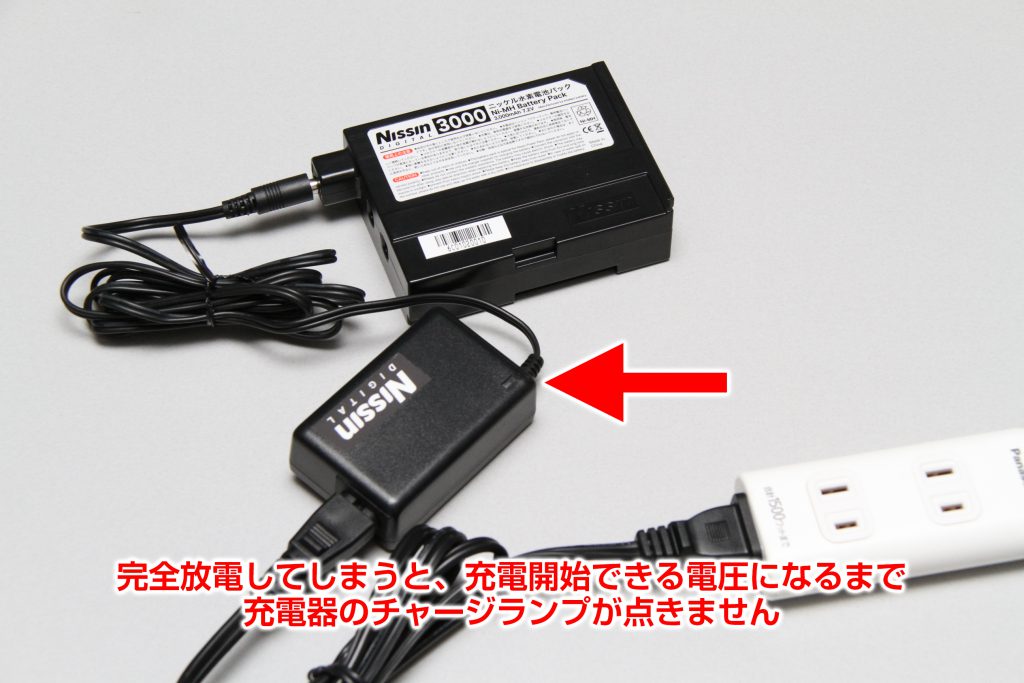 You connect the battery to the charger and plug it in, but the red charging lamp does not light up. Why is that?
This phenomenon occurs when the battery is in an "over-discharged state" due to long periods of disuse, severe depletion, or forgetting to turn off the power after use.
Because there is not enough voltage to begin charging, rapid charging does not start, and the charging lamp remains off during that time.
So, what should you do? You don't need to do anything special; simply "leave it in the charging state for about 30 minutes to an hour."
First, it will charge slowly until it reaches the voltage level necessary for charging to begin, and once it reaches the specified voltage, rapid charging will start and the red lamp will light up.
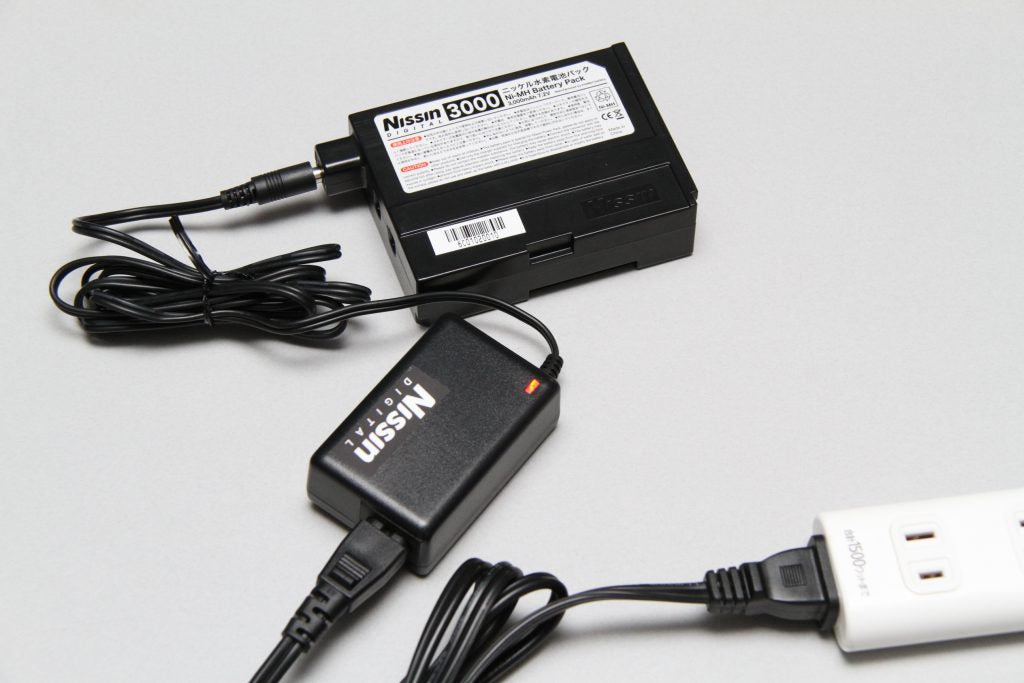 If you leave it for about 30 minutes, the red lamp will light up like this and charging will begin.
 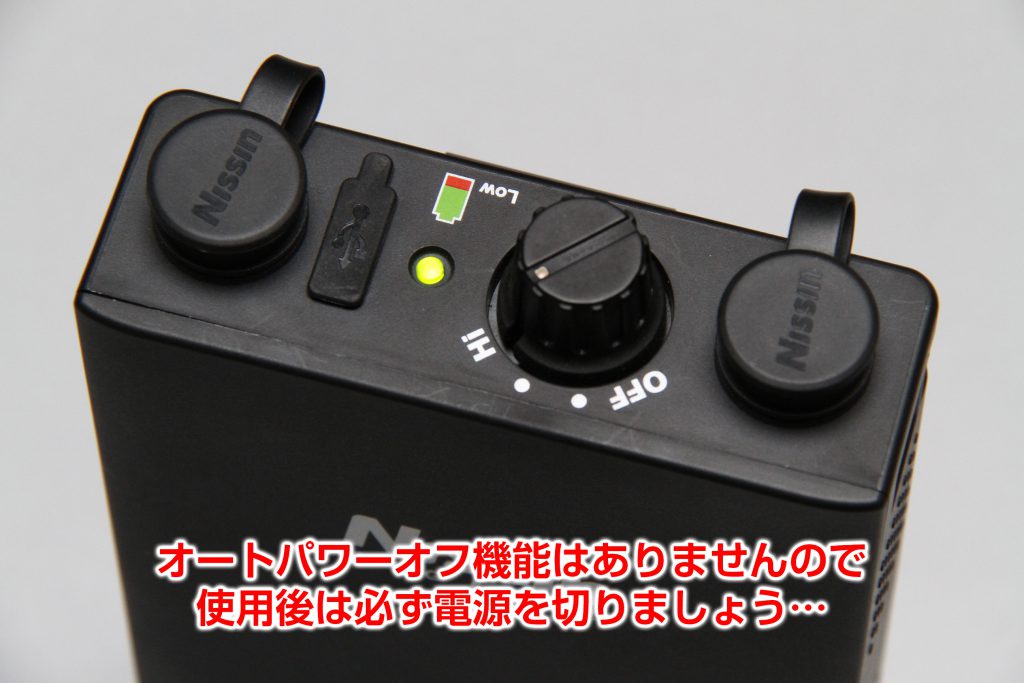 Don't forget to turn off the power after use. This unit does not have an auto-power-off function; if you leave it on, the battery will be drained completely.
It is said that keeping a battery in an over-discharged state, or conversely, always keeping it fully charged, is bad as it shortens battery life.
Unless you use it frequently, if you use it only occasionally, we recommend "fully charging before use and storing it as is after you finish shooting."
If the red lamp does not light up even after starting, please try charging it for about an hour to see if the red lamp lights up and charging begins. If it still does not light up, there may be a malfunction in the battery or charger; please contact us for an inspection.
Q. The flash won't turn on even though I connected the power pack.
Applicable models: PS8
A. When using the Power Pack PS8, batteries are also required inside the flash unit itself due to the specifications. (This is the same when using camera manufacturers' genuine external power supplies. Please refer to the flash unit's instruction manual for details.)
Typically, a flash converts and supplies electricity from a single power source (such as AA batteries, around 6V) for the low-voltage circuits used for flash output control, the LCD panel, and zoom mechanisms, while simultaneously supplying electricity for the 300V+ circuit used to charge the main capacitor for the flash tube.
The power pack (external power supply) supplies the latter—power to charge the main capacitor—from an external source, which leads to shorter charging times and an increased number of flashes. However, because a separate power source is required for the internal circuits, the flash will not turn on unless batteries are also inserted into the flash unit itself. (Previously, other companies sold external power supplies that used two types of batteries (a stacked battery, etc., and AA batteries) to output two types of voltage; however, modern flashes are not compatible with external power supplies of that type.)
Please note that while using the power pack allows for continuous flash at high output, excessive heat from the flash tube can cause rapid degradation of the flash head unit and deformation or scorching of the Fresnel lens.
Typically, a flash converts and supplies electricity from a single power source (such as AA batteries, around 6V) for the low-voltage circuits used for flash output control, the LCD panel, and zoom mechanisms, while simultaneously supplying electricity for the 300V+ circuit used to charge the main capacitor for the flash tube.
The power pack (external power supply) supplies the latter—power to charge the main capacitor—from an external source, which leads to shorter charging times and an increased number of flashes. However, because a separate power source is required for the internal circuits, the flash will not turn on unless batteries are also inserted into the flash unit itself. (Previously, other companies sold external power supplies that used two types of batteries (a stacked battery, etc., and AA batteries) to output two types of voltage; however, modern flashes are not compatible with external power supplies of that type.)
Please note that while using the power pack allows for continuous flash at high output, excessive heat from the flash tube can cause rapid degradation of the flash head unit and deformation or scorching of the Fresnel lens.
Q. Which mount should I choose when connecting to the MG10, MG8, or flashes for Fujifilm, Olympus/Panasonic?
Applicable models: PS8
A. Our MG10*, MG8*, and the Di700A and i60A for Fujifilm and Olympus/Panasonic (Four Thirds) use a Sony-style external power connector, so please purchase the PS8 for Sony or the separately sold Sony power cord.
*Even if sold as a set with the Air10s, the flash unit itself uses the same mount (Sony external power connector) for all versions.
*Even if sold as a set with the Air10s, the flash unit itself uses the same mount (Sony external power connector) for all versions.
Q. The battery life is poor even after a full charge.
Applicable models: PS8
A. If the Ni-MH cluster battery used in the PS8 and similar products is left unused for a long time, the chemical reactions inside the battery can decline, resulting in shorter usage times or complete discharge where it cannot be charged at all. If the charger lamp changes from red to green when charging the battery, it can be assumed that it has not been completely discharged. (If the charger lamp does not light up, please refer to this article.)
If the usage time has shortened, it is expected to recover to some extent by repeating charge/discharge cycles. If the lamp on the PS8 unit lights up green or red immediately after charging, try using it until the lamp flashes red (discharge) -> recharge the battery -> and repeat this use until the red flash 2 to 3 times. Please refer to this article for storage instructions when not in use for a long period.
If the usage time has shortened, it is expected to recover to some extent by repeating charge/discharge cycles. If the lamp on the PS8 unit lights up green or red immediately after charging, try using it until the lamp flashes red (discharge) -> recharge the battery -> and repeat this use until the red flash 2 to 3 times. Please refer to this article for storage instructions when not in use for a long period.