
MF18 Frequently Asked Questions (FAQ)
Here are the frequently asked questions and answers regarding the MF18. You can narrow down your search using the search box at the top of the page. If your issue is not resolved, please contact us.
List of Questions (38)
- How can I determine if the unit is malfunctioning?
- How to reset the MF18 / MG8000 / Di866 series
- Is the MF18 firmware updated during repair?
- Can I have my current MF18 converted to an MF18 II?
- My MF18 malfunctioned shortly after purchase. Is there a repair fee?
- Images taken with the MF18 are dark and resetting does not fix it. What should I check?
- What does "exchange for a refurbished unit" for the MF18 mean?
- How do I request a repair for the MF18, and what should be included in the package?
- Can an MF18 be repaired if the mounting foot is broken due to a drop?
- What should I do if the batteries in the MF18 battery magazine are loose or not held in place?
- The MF18 will not turn on after being dropped.
- What are the differences between the MF18 and the MF18 II?
- Can the MF18 be attached to the AI AF Micro-Nikkor 60mm f/2.8D?
- How do I change the contact email address or newsletter subscription address during an ongoing repair?
- Can the MF18 be attached to any lens 77mm or smaller? Are there any points to note?
- Can I buy an 82mm adapter ring for the MF18 in Japan? How can I attach it to an 82mm lens?
- Are there any recommended cases for storing the MF18 (MF18 II) together with a camera and lens?
- Can someone unfamiliar with cameras use the MF18 simply by turning it on? (TTL flash control)
- Can the MF18 be attached to lenses where the filter attachment part moves during focusing?
- When performing intraoral photography with an APS-C camera like the Z50, which is better: the NIKKOR Z MC 50mm or MC 105mm?
- Why does the MF18 not fire normally (whiteout) on cameras not listed in the compatibility table (e.g., EOS Kiss X10)?
- The MY TTL value of my MF18 changes on its own when I replace the batteries.
- Are there any covers or caps to protect the lens when carrying the MF18 attached?
- What is the power source for the MF18? Can I use AC mains power (100V) or a power cable?
- What are the causes and remedies if photos taken with the MF18 in TTL mode are dark (especially the back teeth, while increasing compensation causes the front teeth to blow out)?
- How can I check if it works with a new, unverified camera?
- Can I supply 5V DC or similar to the MF18 external power terminal? What is the USB terminal for?
- Can the MF18 (Nikon version) be attached to the Tamron 90mm macro lens (62mm filter diameter)?
- When taking portrait photos with the same settings as intraoral photography, the shadows are too harsh. What are the settings for backlit situations like in front of a viewbox?
- Why is it impossible to set the Group A row in the MF18 wireless TTL mode (displayed as "---")?
- If photos taken with the MF18 are dark, how can I determine if the issue is with the camera or the flash?
- Why is F22 the recommended setting? Can't I get more depth of field by stopping down further, like to F32?
- Do the MF18 flash tubes wear out? How can I extend their lifespan?
- How do I attach the MF18 (MF18 II) to the NIKKOR Z MC 50mm f/2.8? Do I need a 46mm adapter ring?
- Can the MF18 be used with kit lenses (zoom lenses not intended for macro photography)?
- Photos taken with the MF18/MF18 II are blown out. What are the causes and solutions?
- The camera shows a "Lens not attached" error. What is the relationship with the MF18 and how do I fix it?
- The automatic flash control in the MF18 A/TTL mode is not working, and the light output seems constant even when aperture or distance changes. What is the cause?
Q. How can I determine if the unit is malfunctioning?
Applicable models: MF18
※ Note: If you request a repair without first trying these steps (resetting, cleaning, etc.), and the issue is resolved by our performance of these tasks—regardless of the warranty status—we will charge a separate fee for verification. ① Resetting the MF18② Hot shoe cleaningLink to hot shoe cleaning guide
Symptoms
- Neither flash head A nor B fires1-1 Pilot light is (off / lit in red / takes a long time to turn green) → Replace batteries After checking the battery orientation, if the power does not turn on or the symptom persists after a reset, the batteries may be exhausted. Please replace all four with new alkaline or fully charged NiMH batteries. 1-2 Pilot light fires when pressed but doesn't fire with the camera shutter → Reset, clean There may be a software glitch or a poor connection with the camera. Please ensure the unit is correctly attached to the camera, then try resetting and cleaning the hot shoe. 1-3 Flash does not fire even when the pilot light is pressed → Request repair If it does not fire after a reset, the product may be faulty; please request a repair. 1-4 Flash fires intermittently when the coiled cord is moved → Request repair The coiled cord may be broken; please request a repair.
-
Sometimes only one of flash heads A or B fires even after reset
→ Request repair This may indicate a broken cord or degraded flash tube; please request a repair. -
Flash fires but (images are dark / inconsistent brightness in similar shots / images are pure white even when settings are changed)
→ Reset, clean hot shoe → Request repair If resetting or cleaning does not improve the situation, the product may be faulty; please request a repair. -
Popping sounds, other abnormal noises, odors, or overheating
→ Request repair Since the product is not hermetically sealed, dust inside the flash head may burn from the heat of the tube, causing a slight smell of burning paper. If you hear a "pop" or detect smoke, unusual odors, or abnormal heat, immediately remove the batteries and request a repair.
Q. How to reset the MF18 / MG8000 / Di866 series
Resetting the MF18 / MG8000 / Di866 series (Method 1)
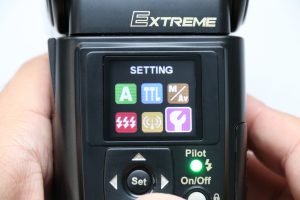
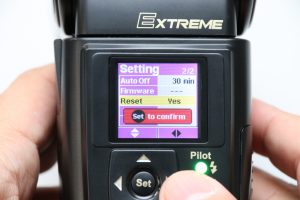
Resetting the MF18 / MG8000 (Method 2)
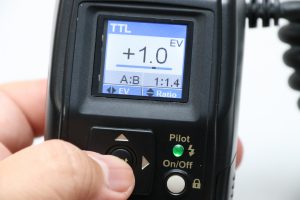
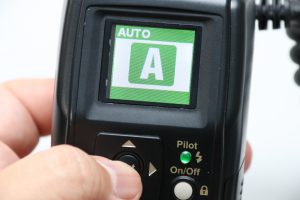
Q. Is the MF18 firmware updated during repair?
Applicable models: MF18, MF18 II
Q. Can I have my current MF18 converted to an MF18 II?
Applicable models: MF18, MF18 II, MF-PL
Q. My MF18 malfunctioned shortly after purchase. Is there a repair fee?
Applicable models: MF18
Q. Images taken with the MF18 are dark and resetting does not fix it. What should I check?
Applicable models: MF18
If the problem persists or only one side fires, we will accept the product for inspection and repair (Repair Request).
Q. What does "exchange for a refurbished unit" for the MF18 mean?
Applicable models: MF18
Q. How do I request a repair for the MF18, and what should be included in the package?
Applicable models: MF18
Q. Can an MF18 be repaired if the mounting foot is broken due to a drop?
Applicable models: MF18
Q. What should I do if the batteries in the MF18 battery magazine are loose or not held in place?
Applicable models: MF18
Q. The MF18 will not turn on after being dropped.
Applicable models: MF18
If it still does not turn on, or if it turns on but does not fire correctly, or if there is unusual noise, odor, heat, or smoke, immediately stop using it and submit a Repair Request. Repairs for drop damage can be complex; if we determine it is unrepairable, we may suggest a trade-in purchase. Please check Repair Fees and Applicable Models for costs.
Q. What are the differences between the MF18 and the MF18 II?
Applicable models: MF18, MF18 II, MF-PL
MF18 / MF18 II / Cross-Polarizing Filter MF-PL
Q. Can the MF18 be attached to the AI AF Micro-Nikkor 60mm f/2.8D?
Applicable models: MF18
Q. How do I change the contact email address or newsletter subscription address during an ongoing repair?
Q. Can the MF18 be attached to any lens 77mm or smaller? Are there any points to note?
Applicable models: MF18
62mm lenses (e.g., AF-S VR Micro Nikkor 105mm f/2.8G IF-ED, NIKKOR Z MC 105mm f/2.8 VR S) can be attached using the included adapter ring. When using F-mount lenses on Z-series cameras, an FTZ II adapter is required.
Q. Can I buy an 82mm adapter ring for the MF18 in Japan? How can I attach it to an 82mm lens?
Applicable models: MF18
Q. Are there any recommended cases for storing the MF18 (MF18 II) together with a camera and lens?
Applicable models: MF18, MF18 II
Q. Can someone unfamiliar with cameras use the MF18 simply by turning it on? (TTL flash control)
Applicable models: MF18
However, TTL flash control cannot be used with some third-party lenses that lack electrical contacts on the mount, as aperture and distance data are not transmitted to the camera (it generally works fine with autofocus-compatible lenses).
Q. Can the MF18 be attached to lenses where the filter attachment part moves during focusing?
Applicable models: MF18
Q. When performing intraoral photography with an APS-C camera like the Z50, which is better: the NIKKOR Z MC 50mm or MC 105mm?
Applicable models: MF18
The NIKKOR Z MC 105mm f/2.8 VR S can also be used, but because of its longer focal length, you must keep a greater distance from the subject, making shooting posture more difficult; the lens is also large and heavy, making it difficult to hold with one hand.
Note: If your MF18 firmware is old, it might not support the Z series. In that case, please contact us.
Q. Why does the MF18 not fire normally (whiteout) on cameras not listed in the compatibility table (e.g., EOS Kiss X10)?
Applicable models: MF18
- Camera is not compatible: We have not verified cameras not listed in the compatibility table and cannot guarantee operation. For example, the EOS Kiss X10 lacks an X-contact (center pin), so it likely won't work (the "EOS Kiss X10i" is a different model).
- Outdated firmware: Please check the firmware update method for details on checking/updating.
- Program glitch: Pressing and holding the Set button for over 10 seconds while powered on resets the unit and automatically switches it to A mode.
- MF18 hardware defect: If it fires at full power even during pilot light test, or does so on other compatible camera bodies. In this case, please request a repair.
- Reset the MF18: Press and hold the [Set] button for over 10 seconds (until the screen changes to green "A").
- Check if the camera's "Exposure Compensation" or "Flash Compensation" is set to the plus (+) side (see your camera manual for instructions).
- If the camera is not officially verified, whiteout from the start might be a compatibility issue rather than a defect. If you have another camera body you previously used normally, try attaching it to confirm proper function.
Q. The MY TTL value of my MF18 changes on its own when I replace the batteries.
Applicable models: MF18
Q. Are there any covers or caps to protect the lens when carrying the MF18 attached?
Applicable models: MF18, MF18 II
To protect the lens, attaching a lens protection filter between the lens and the adapter ring is also effective. Since inexpensive filters can reduce image quality or be difficult to clean, we recommend protection filters labeled as "water-repellent/anti-fouling."
Q. What is the power source for the MF18? Can I use AC mains power (100V) or a power cable?
Applicable models: MF18
Q. What are the causes and remedies if photos taken with the MF18 in TTL mode are dark (especially the back teeth, while increasing compensation causes the front teeth to blow out)?
Applicable models: MF18, MF18 II
- Focus is set closer than the intended subject: If focused too close, output is restricted, making the back look dark. If the AF red frame is not where you intend it to be in Auto-area AF, please switch to a different AF area mode.
- Mirror reflectance: Glass mirrors with special coatings have near 100% reflectance and minimal effect, but stainless steel mirrors have about 60–70% reflectance, which can lead to darkening.
- Light is not hitting correctly: Due to parallax between the lens and the flash head, at close distances, lips might cast shadows, or the mirror angle might be inappropriate. Rotate the flash head unit to adjust, or change the angle of the mirror.
Q. How can I check if it works with a new, unverified camera?
Applicable models: MF18, MF18 II
Q. Can I supply 5V DC or similar to the MF18 external power terminal? What is the USB terminal for?
The USB terminal (USB mini-B) shown in the instruction manual is for firmware updates only. If you input 5V, the LCD will turn on and you can operate the menu, but the unit will not charge, and the flash will not fire.
The Battery Magazine BM-01 is included with the main unit but is also sold separately (for how to purchase, please see How to Purchase). If you use it frequently for business, it is convenient to have an extra BM-01 set with charged nickel-metal hydride batteries, allowing for battery replacement in a matter of seconds.
Q. Can the MF18 for Nikon be attached to a Tamron 90mm macro lens (62mm filter diameter)?
Applicable models: MF18
Q. When taking portrait photos using the same settings as for intraoral photography, the shadows appear too dark. What settings should I use if there is a backlit background, such as a film viewer?
Applicable models: MF18, MF18 II
Using a film viewer creates backlighting, which can cause flare due to diffuse reflections within the lens, potentially leading to a foggy, blurred image or distorted colors, so please take test shots while adjusting the settings. Depending on the environment, you may be able to get good results using the camera's P mode.
If your camera has a user preset function (e.g., U1, U2 on the D610), it is convenient to register the intraoral and portrait settings separately and switch between them using the mode dial. Please note that the D100 uses different external flash communication specifications than modern models, so the MF18's TTL and A (Auto) modes cannot be used.
Q. Why is the Group A row set to "---" in the MF18's Wireless TTL mode, and why can't I configure it?
Applicable models: MF18
Q. If photos taken with the MF18 are dark, how can I determine if the issue is with the camera or the flash?
Applicable models: MF18, MF18 II
- Initialize the external flash settings in the camera menu.
- Set the exposure compensation to ±0.
- If that does not resolve the issue, initialize the camera settings themselves, then reset the ISO sensitivity, aperture, and shutter speed for intraoral photography.
For lenses without electrical contacts, such as manual focus-only lenses, the MF18's A (Auto) and TTL modes cannot be used; please use M (Manual) mode or switch to a lens with contacts.
If the images are dark on other cameras as well, there may be a defect in the MF18. Because there is a possibility of a program malfunction, please first try the reset method. Since exhausted batteries can cause longer charging times or weaker flashes, if the pilot lamp takes a long time to change from red to green, please replace the batteries with new alkaline batteries or fully charged nickel-metal hydride batteries. If this does not improve the situation, or if only one side of the flash fires, please request a repair. If the unit is within one year of purchase, please attach proof of purchase (receipt, order history, etc.).
Q. Why is the recommended setting F22? Wouldn't stopping down further, such as to F32, provide better depth of field?
Applicable models: MF18, MF18 II
The recommended values listed on the web are an example of settings that allow even those unfamiliar with photography to take shots with almost no failures; you do not necessarily have to use these exact values. Please take test shots while changing the aperture and ISO sensitivity to find your preferred settings. Furthermore, with the same angle of view and aperture, the larger the sensor, the shallower the depth of field. Please note that on Nikon cameras, the aperture automatically opens as the shooting distance decreases, so the actual depth of field may be slightly shallower than the same F-number displayed on Canon cameras.
Q. Do the MF18 flash tubes wear out? How can I extend their lifespan?
Applicable models: MF18
If you cannot reduce the number of shots taken for business, you can increase the ISO sensitivity or open the aperture to reduce the required flash output, thereby extending the lifespan. Doubling the ISO sensitivity halves the required flash output, and opening the aperture by 1/1.4x (three clicks in typical settings) also halves the output. However, since increasing ISO sensitivity lowers image quality and opening the aperture narrows the area in focus, we recommend ISO 400 or lower and aperture F22 or higher for intraoral photography.
Q. How do I attach the MF18 (MF18 II) to a NIKKOR Z MC 50mm f/2.8 lens? Is a 46mm adapter ring required?
Applicable models: MF18, MF18 II
While it is physically possible to attach the unit to the 46mm filter thread at the tip of the lens by using a step-up ring or similar, please do not do so, as this puts stress on the internal lens motor and may cause failure.
Q. Can I use the MF18 with a kit lens (zoom lens not intended for close-ups)?
Applicable models: MF18
Q. Photos taken with the MF18/MF18 II appear overexposed (whiteout). What are the causes and solutions?
Applicable models: MF18, MF18 II, MF-PL
Solution: Blowing off moisture before shooting can reduce reflections. Also, using a cross-polarizing filter (MF-PL) can significantly suppress reflections (exclusively for MF18 II).
When shooting with Auto ISO, due to the specifications of the MF18, the sensitivity may rise to the same level as if no flash were used, unlike with genuine flashes. At high sensitivities such as ISO 6400 or ISO 12800, the exposure will be excessive even at the MF18's minimum light output (1/64-2/3EV), so please set the ISO sensitivity manually. If images are still completely white even when set to around ISO 100–800, there may be a defect, in which case we will handle it through repair or replacement (Repair Request).
When investigating defects, we will ask for your camera's exposure mode, shutter speed, aperture, ISO sensitivity, the MF18's flash control mode (TTL/Manual) and settings (TTL exposure compensation value / manual output level), and the conditions under which the issue occurs.
Q. A "Lens not attached" error appears on the camera. What is the relationship with the MF18 and how should I handle it?
Applicable models: MF18
Please note that lenses without electrical contacts may not be recognized as attached, resulting in a "Lens not attached" display. In this case, the MF18's A (Auto) and TTL modes cannot be used; please use M (Manual output) mode.
Q. The automatic flash control in the MF18's A/TTL mode is not working, and the light intensity seems constant even when the aperture or distance is changed. What is the cause?
Applicable models: MF18
- The lens does not support automatic flash control: For lenses without electrical contacts that cannot convey aperture information to the camera—such as foreign-made manual-focus-only lenses or lenses from other manufacturers included with dental imaging systems—TTL flash control will not operate normally even if the flash fires. It may also fail to operate correctly if a mount converter or extension tube is used.
- ISO sensitivity is set to AUTO or is very high: Setting ISO to auto indoors can lead to high sensitivity, causing the flash to exceed its control range and overexpose; therefore, we recommend ISO 100–400 for close-up photography.
- Camera wireless flash (WL) is set to "ON": Please set it to "OFF."
- Failure of the camera or MF18 (including initial defects): If an error appears on the camera screen, poor contact due to dirt or deformation on the hot shoe may also be a cause.